
Download Wallpaper Generate – AI‑Powered Wallpaper Creator, Free & Secure
Overview
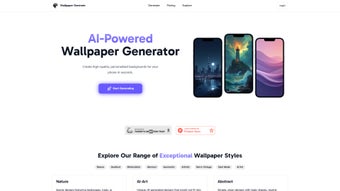
Wallpaper Generate is a modern, AI‑driven web application designed to simplify the creation of high‑resolution phone wallpapers. In an era where visual personalization has become a daily expectation, this tool places sophisticated generative‑art technology directly in the browser, eliminating the need for heavyweight desktop software or specialized design skills. Users begin by entering a concise text prompt—think “misty forest at dawn” or “neon cyberpunk skyline”—and the system instantly produces several design variations that reflect the requested mood, color palette, and style.
The interface is deliberately minimalist: a clean input field, a style selector, and a real‑time preview window keep the workflow intuitive, even for beginners. Because all processing occurs on secure cloud servers, the application remains lightweight and responsive on any device, from low‑end Android phones to high‑end iPads. Each generated image is automatically stored in a private cloud library, allowing seamless access across multiple devices and instant sharing via a unique link.
Wallpaper Generate offers a tiered pricing model, starting with a generous free plan that limits daily generations, and scaling to premium subscriptions that unlock unlimited creations, higher‑resolution exports, and exclusive style packs. Whether you are a casual smartphone user looking to refresh your home screen daily, a graphic designer seeking rapid mock‑ups, or a marketer needing brand‑aligned visuals for mobile campaigns, Wallpaper Generate provides a secure, fast, and affordable solution that bridges the gap between AI innovation and everyday creativity.
Key Features & Capabilities
The true strength of Wallpaper Generate lies in its comprehensive feature set, which has been built around flexibility, speed, and user empowerment. The AI engine is trained on millions of image‑text pairs, enabling it to understand nuanced prompts and translate them into visually compelling wallpapers in under ten seconds. A robust style library categorizes designs into nature, gradient, minimalist, abstract, and geometric families, each containing dozens of sub‑styles that cater to a wide spectrum of aesthetic preferences.
Users can fine‑tune color schemes through an intuitive picker or by entering custom hex codes, ensuring that every wallpaper can match brand guidelines or personal tastes. Automatic resolution optimization guarantees that the final output matches the exact pixel dimensions of popular devices, from iPhone 15 Pro Max to Samsung Galaxy S24 Ultra, eliminating the need for manual resizing. All creations are saved to an encrypted personal cloud folder, providing instant access from any modern browser and simplifying cross‑device workflow.
One‑click export options include PNG and JPEG formats, with premium users receiving watermark‑free files. The platform’s subscription plans are competitively priced, offering a free tier with daily limits and premium tiers that provide unlimited generations, exclusive style packs, and priority AI processing. Security is baked into the architecture: data is encrypted in transit (HTTPS) and at rest, and the service complies with GDPR and CCPA regulations, giving users confidence that their creative assets remain private.
- AI‑Driven Design Engine: Generates multiple wallpaper concepts from a simple text prompt in under 10 seconds.
- Extensive Style Library: Includes nature, gradient, minimalist, abstract, and geometric categories with hundreds of sub‑styles.
- Custom Color Controls: Choose preset palettes or enter custom hex codes for precise color matching.
- Resolution Optimizer: Automatically outputs wallpapers at exact pixel dimensions for iPhone, Android, and tablet screens.
- Secure Cloud Storage: Every design is saved to a private cloud folder, enabling instant access from any device.
- One‑Click Export: Export as PNG or JPEG; premium users receive watermark‑free files.
- Flexible Pricing: Free tier with daily limits, plus monthly and yearly premium subscriptions.
- GDPR & CCPA Compliance: Data encryption in transit and at rest ensures privacy and security.
- Cross‑Platform Compatibility: Works on any modern browser; native iOS and Android apps are slated for release.
- Continuous Updates: New style packs and AI improvements are rolled out monthly without user intervention.
Installation & Usage Instructions
Getting started with Wallpaper Generate is designed to be as frictionless as possible, allowing users to move from zero to a fully personalized wallpaper in just a few minutes. First, open a modern web browser—Chrome, Firefox, Edge, or Safari—on any device with an internet connection and navigate to wallpapergenerate.com. On the landing page, click the “Sign Up” button; registration can be completed using an email address or through Google/Facebook OAuth, with instant verification and no credit‑card required for the free tier.
After logging in, the dashboard presents a prominent “Create New Wallpaper” button. Clicking it opens a modal where you type a concise description of the visual you envision. For optimal results, include key adjectives (e.g., “vibrant,” “serene,” “retro”) and any specific elements you want the AI to prioritize.
Next, select a style from the dropdown menu—Nature, Gradient, Minimalist, Abstract, or Geometric. Each style offers default color palettes that you can customize using the built‑in color picker or by entering hex codes directly. Once your prompt and style are set, press the “Generate” button.
Within seconds, up to five distinct wallpaper drafts appear, each accompanied by a thumbnail preview. Hover over a thumbnail to view a full‑screen preview; click “Edit” on any draft to fine‑tune contrast, brightness, saturation, and layout using simple sliders. When satisfied, click “Save to Cloud” to store the design in your personal library, then select “Download” and choose PNG or JPEG.
Premium users receive high‑resolution, watermark‑free files automatically. Finally, transfer the file to your phone via USB, email, cloud sync, or a direct download link, and set it as your wallpaper through the device’s display settings. The entire process typically takes under three minutes for first‑time users, and the platform’s daily generation limits ensure consistent performance even during peak usage.
Compatibility, Pros & Cons
Because Wallpaper Generate is a cloud‑based SaaS solution, its compatibility is defined primarily by browser support rather than operating‑system constraints. The service runs flawlessly on all major desktop browsers (Chrome, Firefox, Edge, Safari) and is fully responsive on mobile browsers for Android and iOS devices. Users on Windows 10+, macOS 10.14+, Android 6+, and iOS 12+ can access the full feature set without installing additional software. While native mobile apps are currently in beta and slated for a 2025 release, the web version already offers a seamless experience across devices, thanks to responsive design and automatic resolution scaling. Below is a balanced overview of the platform’s strengths and areas for improvement.
Pros
- Instant AI generation removes the need for manual design work.
- Extensive style library with deep color customization.
- Secure, GDPR‑compliant cloud storage keeps creations safe and accessible.
- Generous free tier for casual users.
- Automatic resolution optimization for all major phone screens.
- Regular updates introduce fresh styles and improve AI accuracy.
- One‑click export with watermark‑free premium downloads.
Cons
- Requires an active internet connection; offline mode not yet available.
- Free tier imposes daily generation limits.
- Advanced editing tools are limited compared with full‑featured design suites.
- Native mobile apps are still in beta and may have occasional bugs.
- Complex prompts sometimes produce unexpected visual results, requiring iteration.
Frequently Asked Questions
Below are the most common questions we receive from users, along with concise, helpful answers. This section is designed to address concerns about pricing, functionality, security, and more.
Is Wallpaper Generate truly free to use?
Yes. The free tier allows up to ten wallpaper generations per day, giving casual users ample opportunity to experiment. Premium subscriptions remove this limit and add higher‑resolution exports, exclusive style packs, and commercial usage rights.
Do I need to install any software to create wallpapers?
No installation is required. Wallpaper Generate runs entirely in the web browser, making it compatible with Windows, macOS, Android, and iOS devices that support modern browsers.
Can I use the generated wallpapers for commercial projects?
Commercial use is permitted for premium subscribers, who receive full rights to the images they create. The free tier is limited to personal, non‑commercial use only.
How does the AI interpret my text prompt?
The underlying model has been trained on millions of image‑text pairs, enabling it to recognize descriptive keywords and translate them into visual elements. Providing specific details—such as lighting, mood, and key objects—helps the AI produce results that closely match your vision.
Is my data safe when I generate and store wallpapers?
All data transfers are encrypted via HTTPS, and stored designs reside on secure cloud servers that meet GDPR and CCPA standards. Users retain full ownership of their creations, and the platform does not sell or share personal data with third parties.
Conclusion & Call to Action
Wallpaper Generate stands out in the crowded field of mobile‑device personalization tools by delivering a seamless blend of AI creativity, cloud convenience, and robust security. Its ability to turn a simple textual idea into a polished, device‑ready wallpaper within seconds makes it an invaluable asset for anyone looking to keep their phone’s home screen fresh and expressive. The free tier offers a risk‑free entry point, while the reasonably priced premium plans unlock unlimited generations, higher‑resolution assets, and commercial usage rights—features that are particularly attractive to designers, marketers, and small businesses seeking on‑brand visuals without the overhead of traditional design software. Although the requirement for an internet connection and the current lack of a fully featured offline mode may be limitations for some power users, the platform’s rapid development roadmap—including upcoming native mobile apps—promises to address these gaps in the near future. Overall, Wallpaper Generate provides a fast, secure, and cost‑effective solution that democratizes high‑quality wallpaper creation.
Ready to give your phone a fresh, AI‑crafted look? Download Wallpaper Generate now, experiment with the free tier, and discover how effortless personalized design can be. Transform your screen in seconds and join the growing community of users who trust Wallpaper Generate for daily inspiration.
Pros: Lightning‑fast AI generation, diverse style library, secure cloud storage, intuitive interface, affordable premium plans.
Cons: Requires internet connection, limited offline capabilities, native apps still in beta.



.png)



